Proxmox Datacenter
A Terraform-Provisioned Homelab on a Dell PowerEdge R510 — blog
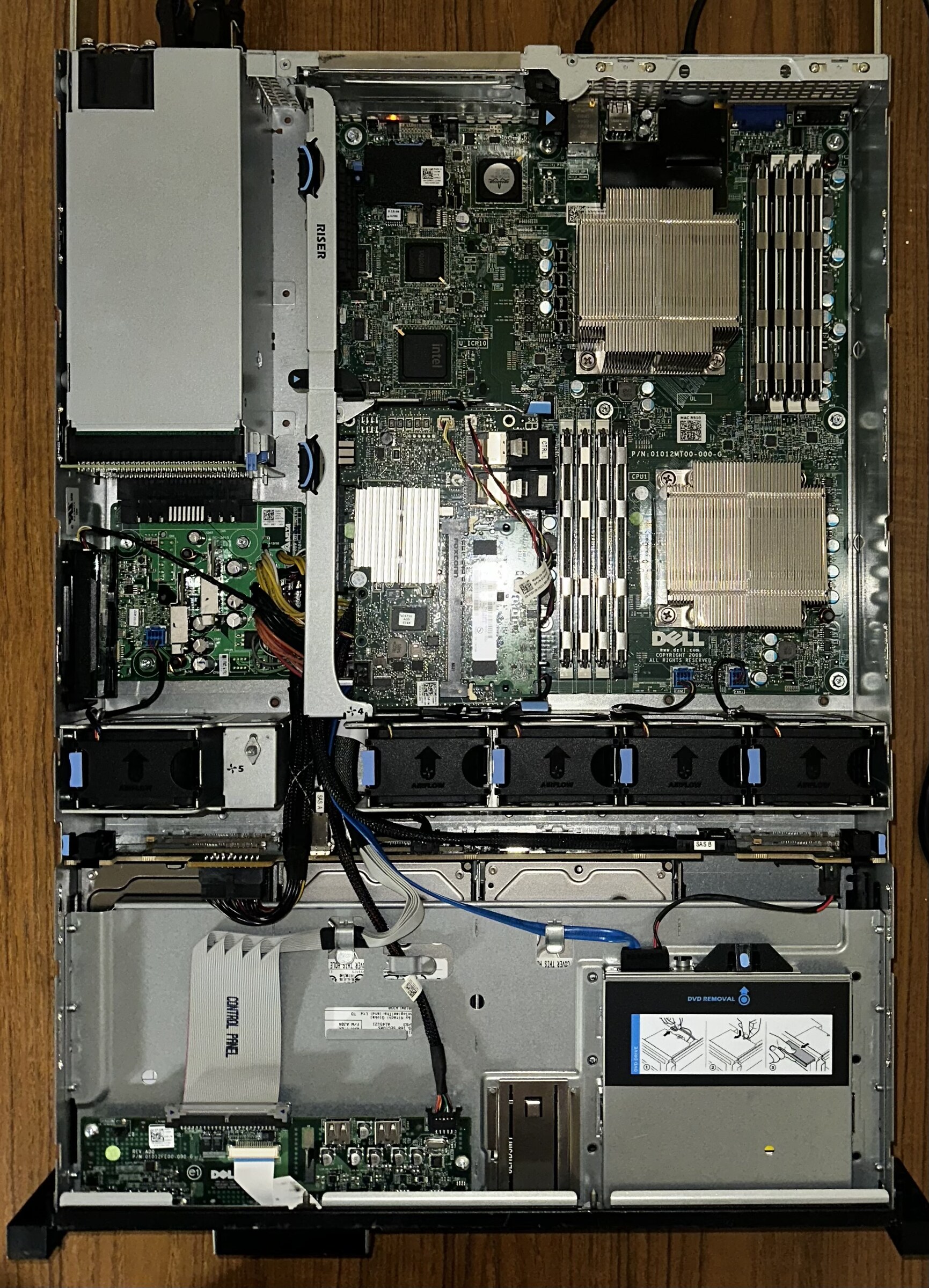
Fig. 1 The host: a Dell PowerEdge R510 2U with dual Xeon E5540s, 64 GB of DDR3 ECC, and six drives across two RAID arrays.
This is a decommissioned enterprise 2U server turned into a personal datacenter. The goal of this project was to make infrastructure reproducible. Every VM on the machine is declared in Terraform and configures itself on first boot. This allows for nodes to destroyed and rebuilt from a few lines of HCL rather than a console session.
Terraform defines each VM as a module block. terraform apply clones the
matching Proxmox template, and Cloud-Init sets the hostname, SSH key, and static
IP before the machine finishes booting.
The VMs join an existing k3s cluster whose control plane runs on my separate Ubuntu server that was built the year before. Five of the nodes are x86 workers VMs, expanding the cluster to seven nodes alongside that control plane and an always-on Raspberry Pi 4 that also sits outside the machine for out-of-band recovery.
Hardware
| Component | Details |
|---|---|
| Host | Dell PowerEdge R510, 2U |
| CPU | 2× Intel Xeon E5540 @ 2.53 GHz (16 threads total) |
| RAM | 64 GB DDR3 ECC |
| OS storage | 465 GB (2× 500 GB, RAID 1) |
| VM storage | 2.7 TB (4× 1 TB, RAID 5) |
| Hypervisor | Proxmox VE 9.2.3 on Debian Trixie |
| Remote management | iDRAC6 Enterprise |
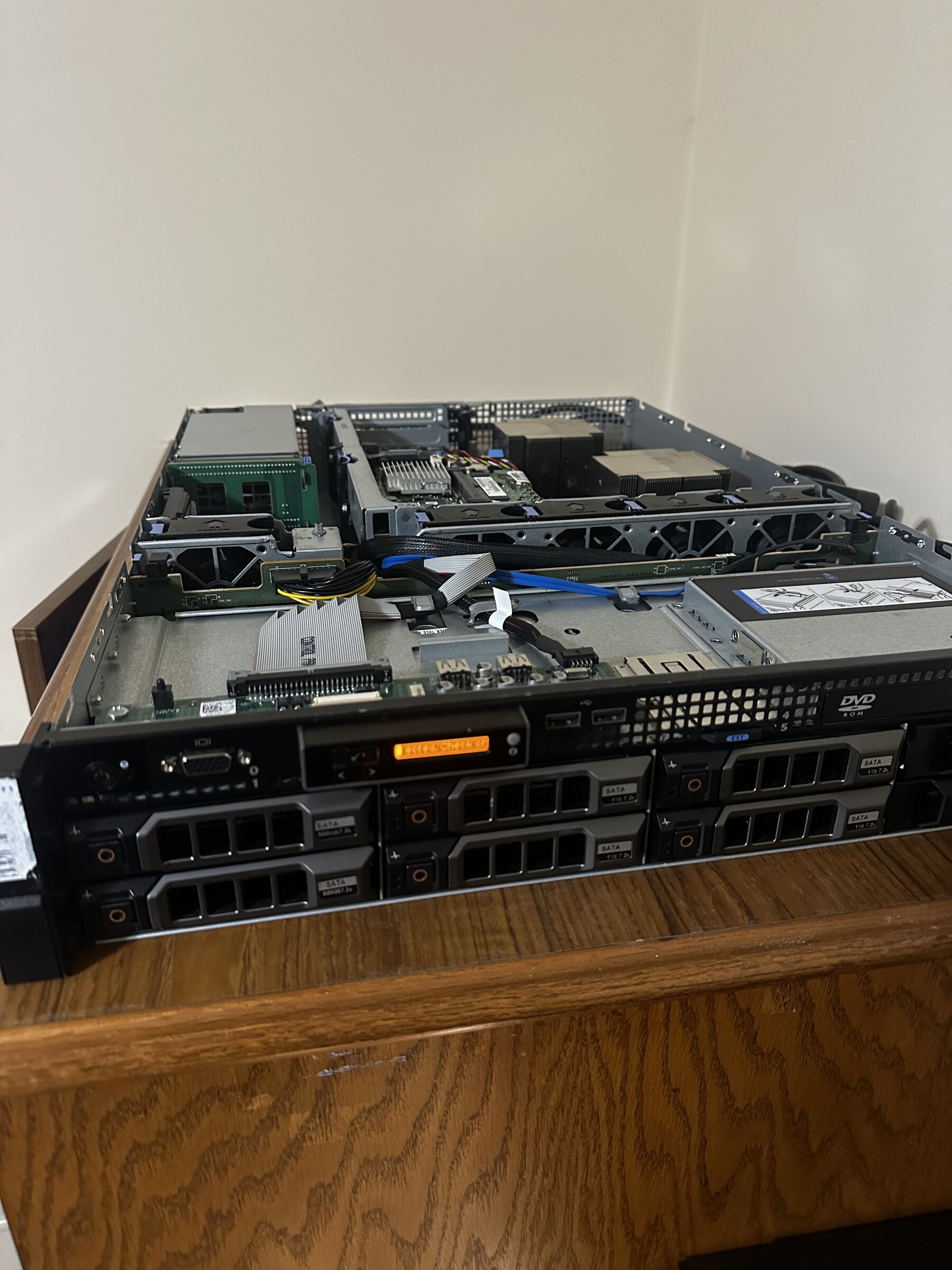
Fig. 2 Open chassis. Two socketed Xeons under the heatsinks, banked DDR3 slots, a row of hot-swap fans, and the RAID-backed drive cage up front.
Design Decisions
Cloud-Init over plain Proxmox templates
A bare template still runs the OS installer on every clone. It opens the console, sets a hostname, a password, an SSH key, and a static IP by hand. Cloud-Init then does the rest of the work on first boot. Proxmox attaches the config as a small virtual CD that the VM reads on boot and applies everything before login is available.
| Plain templates | Cloud-Init |
|---|---|
| Manual config through the console | Config decided before boot, applied automatically |
| Per-VM installer session | apply, then SSH straight in |
k3s over full Kubernetes
The cluster runs k3s rather than Kubernetes. k3s ships as a single binary and needs about 500 MB of RAM versus about 4 GB for a full control plane, and it maintains state in SQLite instead of etcd. The control plane is hosted on the Ubuntu server, instead of a VM here. K3s was chosen because on a machine where the point is to save compute for workloads, the lighter k3s is optimal and nothing in this homelab needs what the heavier k8s add
The subnet router
The subnet router lives on a Raspberry Pi 4. This machine is always on, low draw, and independent of the server’s state. This allows iDRAC and the local subnet to be reachable from anywhere regardless of what the R510’s state.
Implementation
Terraform module layout
terraform/main.tf is a list of module blocks where each block points at a
module for its template type:
module "svc_pihole" {
  source         = "./modules/docker-compose"
  vm_id          = 302
  name           = "svc-pihole"
  ip             = "192.168.0.132/24"
  ssh_public_key = var.ssh_public_key
}
| Module | Purpose |
|---|---|
docker-compose |
App / API service node |
k3s-node |
k3s worker or control plane |
postgres |
PostgreSQL 16 instance |
dev-station |
Full development environment |
The provision path
terraform apply
      │
      ▼
Proxmox clones tmpl-<type>  ──►  Cloud-Init CD attached
      │
      ▼
VM boots ──► Cloud-Init sets hostname, SSH key, static IP
      │
      ▼
ssh yart@<vm-ip>
Network and access
VMs share the host’s vmbr0 bridge on 192.168.0.0/24. A Tailscale overlay with
MagicDNS simplifies connection by allowing access via: proxmox-datacenter:8006 for
the web UI and ssh root@proxmox-datacenter for a shell. iDRAC is reached through
the Raspberry Pi subnet router.
Internet
    │
TP-Link AX1300 (192.168.0.1)
    ├── proxmox-datacenter  192.168.0.103   Proxmox host / vmbr0 bridge
    │       └── VMs on vmbr0 (192.168.0.0/24)
    └── iDRAC6              192.168.0.105   Out-of-band management

Tailscale overlay (100.x.x.x)
    ├── proxmox-datacenter
    ├── omen-server          k3s control plane
    ├── k3s-raspi4b-1        subnet router for 192.168.0.0/24
    └── other clients
Results
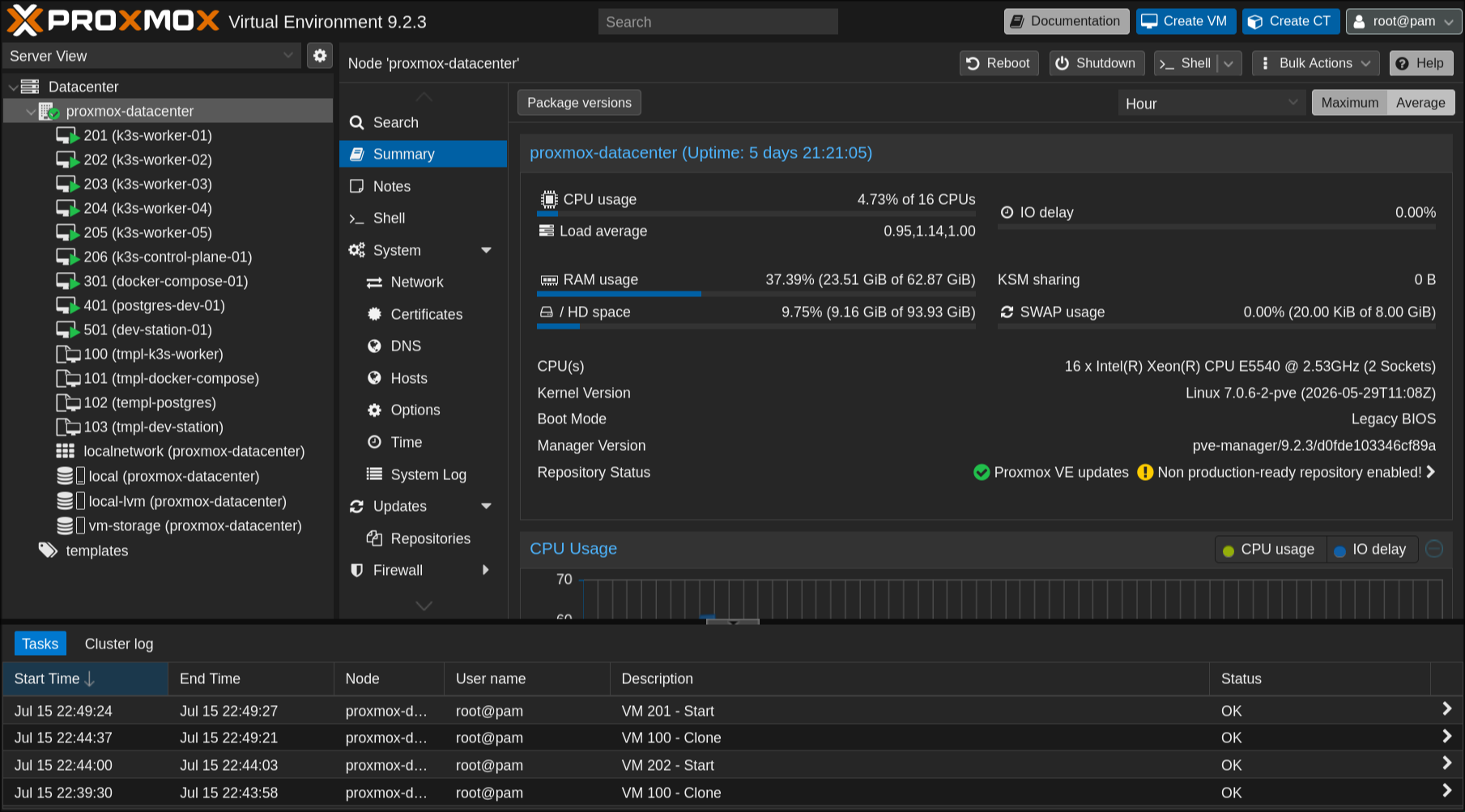
Fig. 3 Steady state. Around ten VMs plus four templates on 16 threads and 62.9 GB of RAM, host CPU under 5%.
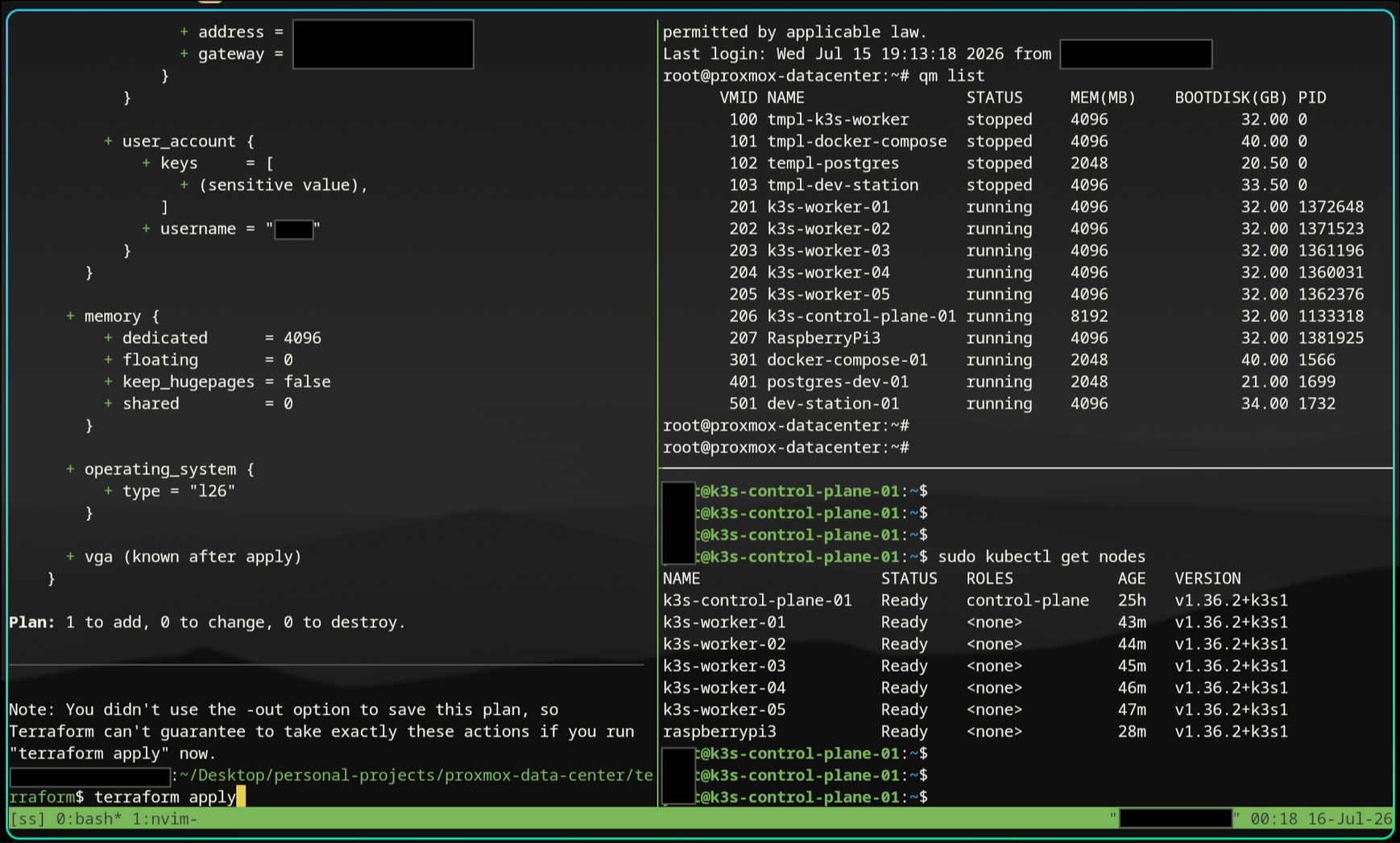
Fig. 4 Everything in one screen: terraform apply on the left, qm list showing the four templates and the running VMs, and kubectl get nodes showing the control plane on the Ubuntu server, five R510 workers, and the Raspberry Pi. Seven nodes Ready on k3s.
What’s Next?
- A monitoring stack (Prometheus + Grafana) pulling host and per-VM metrics.
- GitOps for the k3s workloads so the cluster state is version-controlled too.
- Ansible for software and dependency installation